Plans and Billing
Folio AI uses a simple credit-based model. You spend credits when Folio generates or edits slides, and you choose a plan based on how many credits you need each month. This page explains how credits and billing work.
Start for free
Every new account starts with 500 free credits and no credit card required. That's enough to generate several presentations and try every feature before deciding on a plan.
How credits work
- Credits are the currency you spend each time Folio generates or edits slides.
- On average, generating a complete 10-slide deck uses about 100–200 credits, depending on complexity and content length.
- Monthly plan credits refresh on your billing date.
- Credits don't expire — unused credits roll over to the next billing cycle (rollover is capped under our fair-use policy).
- If you run out, you can buy additional credits or upgrade to a higher plan. We'll let you know when you're getting close to your limit.
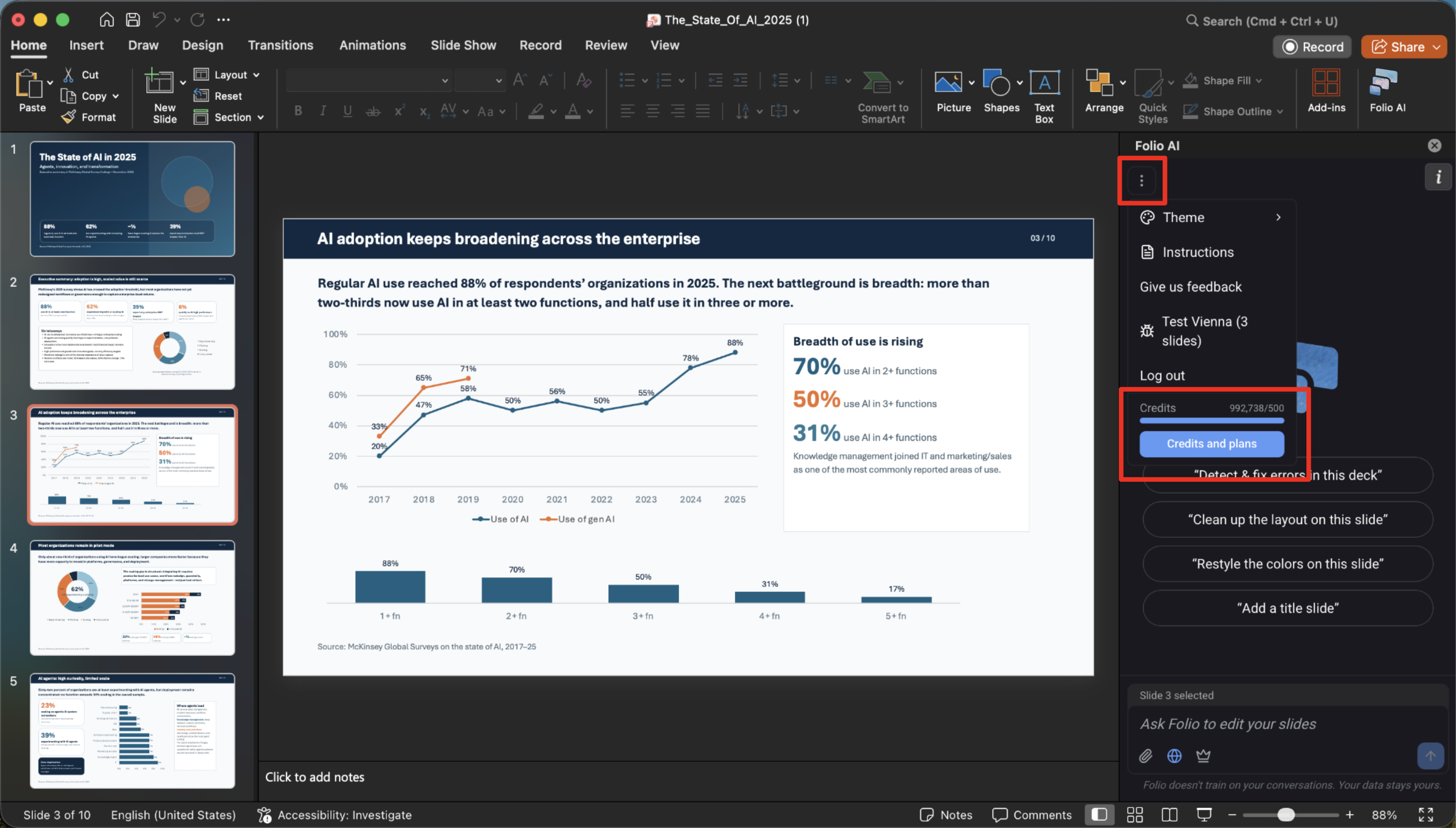
You can check your credit usage at any time by clicking the more icon (⋯) in the Folio side panel. It shows how many credits you've used and how many you have left.
Managing your subscription
You can manage your plan from the Folio side panel in PowerPoint or Google Slides, or from your account in the browser. From there you can upgrade, downgrade, change between monthly and annual billing, or update your payment details.
- Upgrades and downgrades take effect immediately, and we prorate any billing adjustment.
- Changing billing frequency (monthly ↔ annual) is available at any time.
When you need more credits, you have three ways to get them:
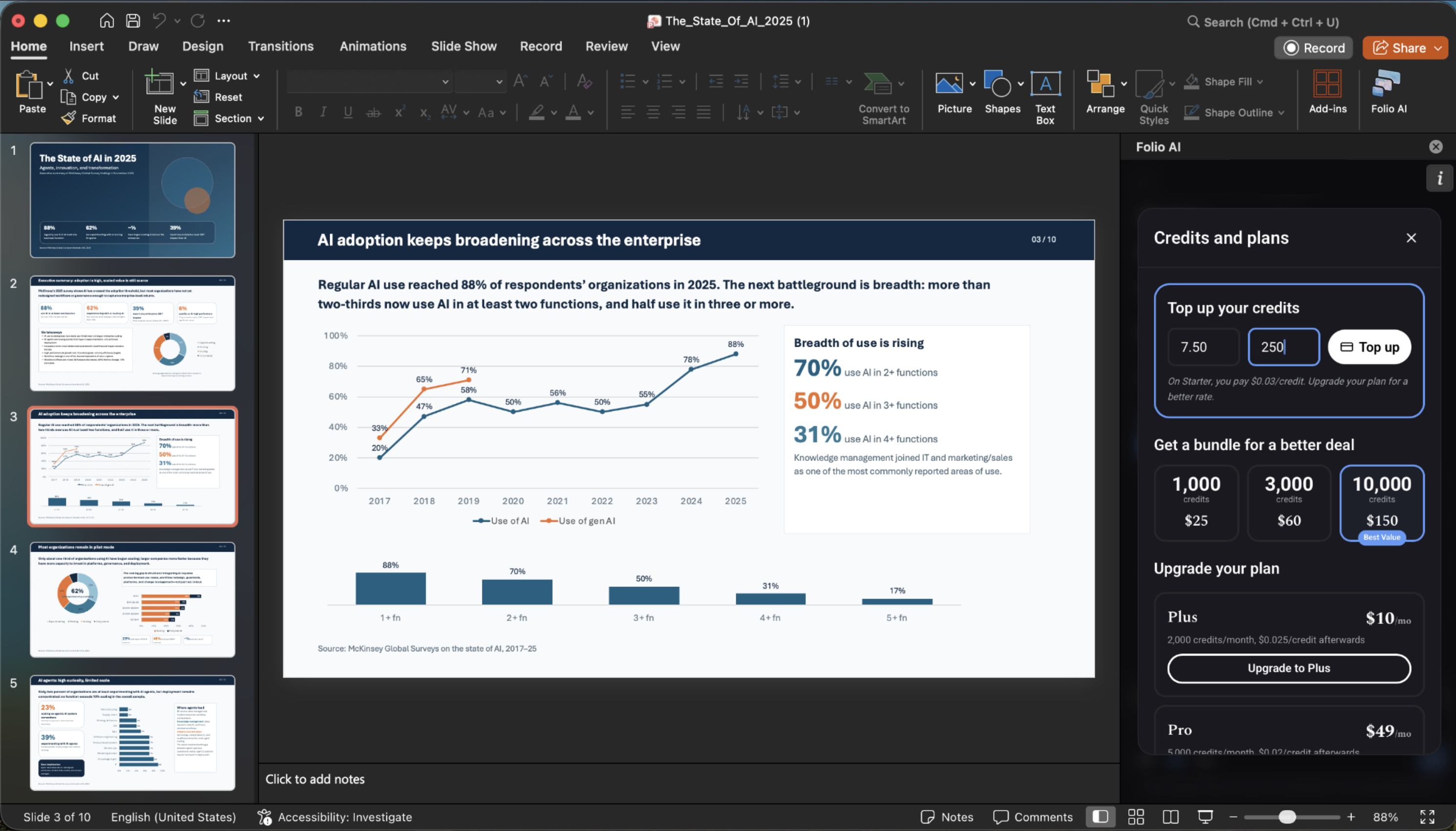
- Top up a custom amount of credits at your plan's overage price — handy for a one-off boost when you're close to your limit.
- Buy a bundle of credits for a better per-credit deal than a custom top-up.
- Subscribe to a plan (or move up a tier) to get the most out of Folio, with a larger monthly credit allowance and more capable models.
Plans
Folio offers a range of plans, from a free starter tier to high-volume and unlimited plans for teams. Higher tiers include a larger monthly credit allowance, a lower per-credit rate beyond your allowance, and unlock more capable Folio models (Fast, Medium, and Max).
- Starter — $0/month. 500 credits to start. Best for first-time users and occasional slide work. Includes AI slide editing, the PowerPoint add-in, the Google Slides add-on, and multi-format exports.
- Plus — $10/month. 2,000 credits per month. Everything in Starter, plus the Folio Medium model and dedicated support access.
- Pro — $49/month. 5,000 credits per month. Everything in Plus, plus the Folio Max model.
- Enterprise — $199/month. 20,000 credits per month. Everything in Pro, plus stored instructions and agent external research.
- Ultimate — $499/month. 50,000 credits per month. Everything in Enterprise, plus SSO & MFA login and a dedicated account manager.
- Unlimited — custom. Unlimited usage for teams that want no limits. Request a quote.
For the full feature breakdown and current pricing, see the Pricing page.
Teams
On team plans, each member gets their own credit allowance, and team owners manage who has access. Adding or removing members adjusts your bill on a prorated basis. Higher tiers also unlock shared capabilities such as stored brand instructions across the team.
Cancellation and refunds
- You can cancel at any time. Your access continues until the end of the current billing period, and you won't be charged again.
- Uninstalling the PowerPoint add-in or Google Slides add-on does not automatically cancel your subscription — cancel from your account settings.
Have a billing question we didn't cover here? Get in touch with our team.